
1. Introduction: Why JSON Web Tokens Power Modern Authentication
JSON Web Tokens (JWT, pronounced "jot") have become the de facto standard for stateless session handling, single sign-on (SSO), and API authorization across modern web and mobile applications. Defined by RFC 7519, a JWT is an open, compact, URL-safe container for transferring structured claims between two parties.
Whether you are implementing OAuth 2.0, OpenID Connect (OIDC), or token-based microservice communication, you will frequently need to inspect the contents of a token during development and debugging. However, inspecting tokens carelessly poses serious security risks. In this tutorial, we cover the anatomy of a JWT, demonstrate how to decode and inspect its claims safely in your browser, and review the security principles every developer must understand.
2. The Golden Rule: Base64URL Encoding Is NOT Encryption
⚠️ Critical Security Warning
A JWT is encoded, not encrypted. Any person, proxy, or browser extension that intercepts or views a standard JWT can immediately decode and read every single claim in its header and payload. Never place passwords, API secrets, unhashed database IDs, or sensitive Personal Identifiable Information (PII) inside a JWT payload.
Many developers mistakenly assume that because a JWT looks like an indecipherable string of random letters and numbers (e.g., eyJhbGciOi...), its contents are confidential. In reality, it is merely formatted using Base64URL encoding so it can safely pass through HTTP headers, query strings, and cookies without character corruption.
3. Anatomy of a JSON Web Token
As illustrated in Figure 1 above, every standard JWT consists of exactly three distinct strings joined by dot (.) delimiters:
..
Part 1: The Header
The header typically contains two fields identifying the algorithm and token type:
alg: The cryptographic signing algorithm used to generate the signature (e.g.,HS256for HMAC-SHA256,RS256for RSA with SHA-256, orES256for ECDSA).typ: The token type, almost universally set to"JWT".
{
  "alg": "HS256",
  "typ": "JWT"
}
Part 2: The Payload (Claims)
The payload contains the actual statements about the entity (typically the authenticated user) and additional context. These key-value pairs are referred to as claims.
{
  "sub": "usr_94820148",
  "name": "Jane Developer",
  "role": "admin",
  "iat": 1729350000,
  "exp": 1729353600
}
Part 3: The Signature
The signature is computed by hashing the Base64URL-encoded header, a dot delimiter, the Base64URL-encoded payload, and the server's private cryptographic secret key using the algorithm specified in the header:
HMACSHA256(
  base64UrlEncode(header) + "." + base64UrlEncode(payload),
  your_256_bit_server_secret
)
The signature is what protects the token against tampering. If a malicious client modifies the payload (for example, altering "role": "user" to "role": "admin"), the signature will no longer match when the server recomputes it upon receiving the request, and the server will reject the token immediately.
4. How Client-Side JWT Decoding Works (4 Steps)
Because the header and payload are simply Base64URL-encoded strings, decoding them does not require cryptographic keys. You can decode a token entirely in browser memory in four distinct steps:
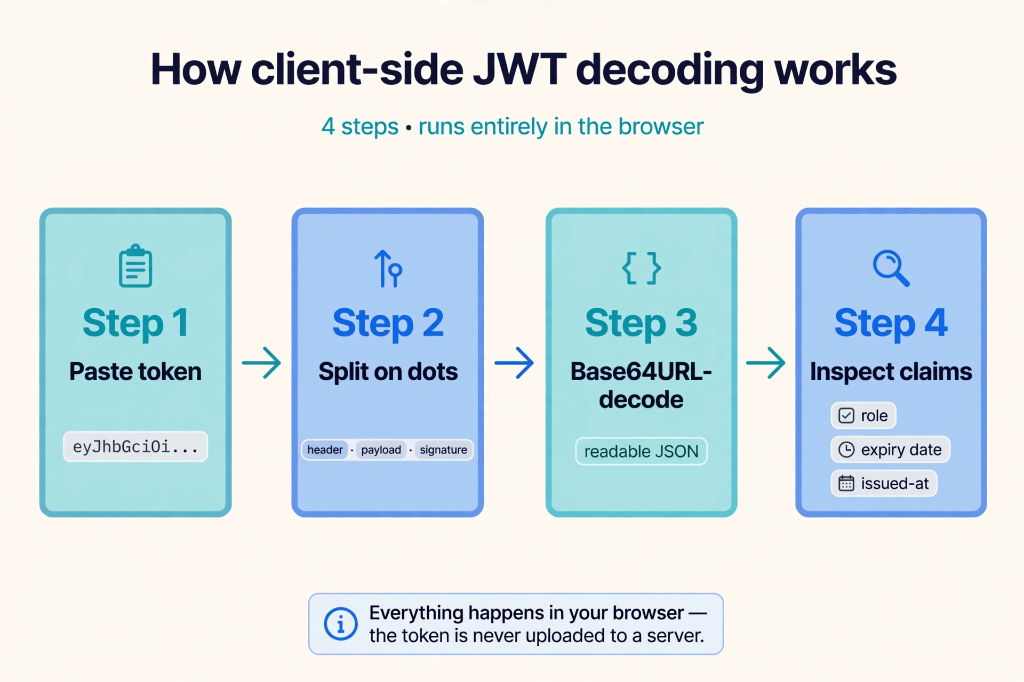
- Step 1 — Paste Token: You paste the full token string into the decoder.
- Step 2 — Split on Dots: The string is divided into an array of three elements:
[header, payload, signature]. - Step 3 — Base64URL-Decode: Base64URL characters (
-and_) are normalized to standard Base64 characters (+and/), proper padding (=) is appended, and the string is decoded into plain UTF-8 text using native browser APIs (such asatob()orTextDecoder). - Step 4 — Inspect Claims: The decoded UTF-8 string is parsed with
JSON.parse()into a syntax-highlighted object displaying user roles, expiry timestamps, and issuer details.
🔒 Why In-Browser Decoding Matters
When you use the HiAtoms JWT Decoder, the decoding logic runs 100% inside your browser's local sandbox. The token string is never transmitted across the network to any server, preventing accidental exposure of sensitive session tokens.
5. Understanding Standard JWT Claims
RFC 7519 specifies a set of registered claim names. While optional, these standard claims are widely used by identity providers like Google, Auth0, AWS Cognito, and Firebase:
| Claim | Name | Description | Example |
|---|---|---|---|
| sub | Subject | The principal / user ID that the token represents. | "usr_102938" |
| iss | Issuer | The authority or authentication server that issued the token. | "https://auth.hiatoms.com" |
| aud | Audience | The intended recipient or API gateway that should accept this token. | "https://api.hiatoms.com" |
| exp | Expiration Time | Unix epoch timestamp (in seconds) after which the token is invalid. | 1893456000 |
| nbf | Not Before | The earliest timestamp when the token may be processed. | 1729350000 |
| iat | Issued At | The timestamp when the token was originally minted. | 1729350000 |
| jti | JWT ID | Unique nonce identifier useful for token revocation lists. | "b6f84d12-1a4e" |
6. Validating Expiration Claims with Epoch Timestamps
The exp claim is always represented as seconds elapsed since the Unix epoch (January 1, 1970 00:00:00 UTC). When troubleshooting expired sessions or token lifespan bugs, you need to convert this raw number into your local timezone.
You can quickly check if a token is expired in JavaScript:
const isExpired = (tokenPayload.exp * 1000) < Date.now();
if (isExpired) {
  console.warn("Token has expired!");
}
If you need to verify or simulate specific expiration dates during debugging, use the HiAtoms Unix Epoch Timestamp Converter to translate seconds directly into human-readable ISO and local datetime strings.
7. Step-by-Step Instructions: Inspecting a JWT on HiAtoms
Follow these simple steps to inspect any token safely without leaking credentials:
- Open the HiAtoms JWT Decoder Tool in your browser.
- Copy your JWT (including header, payload, and signature) and paste it into the primary text area.
- The client-side engine immediately parses the three segments. You will see:
- Header Panel: The algorithm (e.g.
HS256) and format. - Payload Panel: All claims formatted with color-coded syntax highlighting.
- Expiration Badge: An active or expired status indicator that compares the token's
expclaim to your system clock.
- Header Panel: The algorithm (e.g.
- Inspect the roles and permissions to ensure the authenticated user possesses the correct scopes.
8. Essential Security Rules for Web Developers
- Decoding Does Not Equal Verification: Client-side decoding is useful for reading user profile data or detecting expiration, but backends must always verify the signature against the server secret or public key before authorizing requests.
- Disable "alg": "none": Ensure your server-side JWT parsing library explicitly forbids the
"none"algorithm to prevent unauthorized claim spoofing. - Choose Asymmetric Signing for Distributed Systems: Use
RS256orES256(public/private key pairs) when multiple consumer services need to verify tokens minted by a centralized authentication provider without sharing the private signing key. - Store Tokens Securely: For browser single-page applications (SPAs), avoid storing long-lived refresh tokens in
localStoragewhere they are susceptible to Cross-Site Scripting (XSS). Store tokens inHttpOnly,Secure,SameSite=Strictcookies whenever feasible.